


gProjectViewer
2.023.00 Reviews
App Specs
- Version
- 23.3.1204
- Updated On
- License
- Free
- Downloads
- 100,000+
- Developer
- Housatonic Software
- Categories
- Business
- Platform
- Android
Screenshots
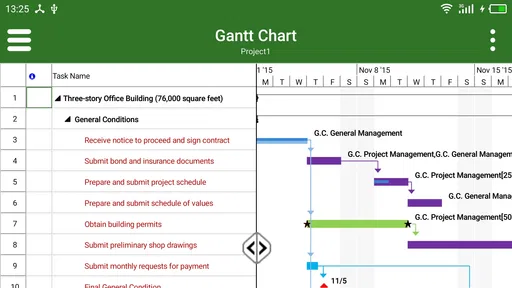
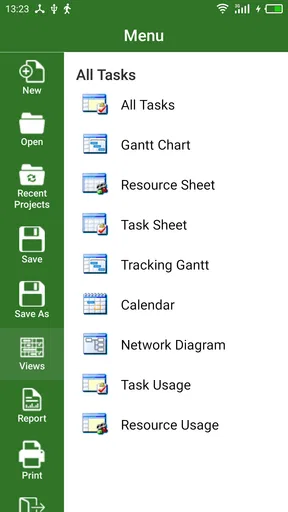
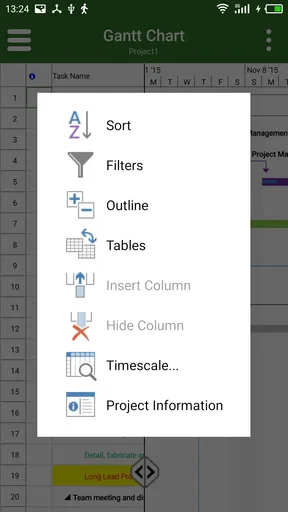
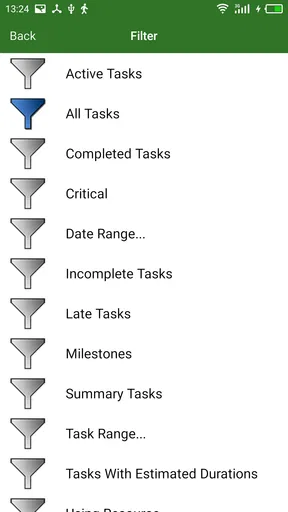
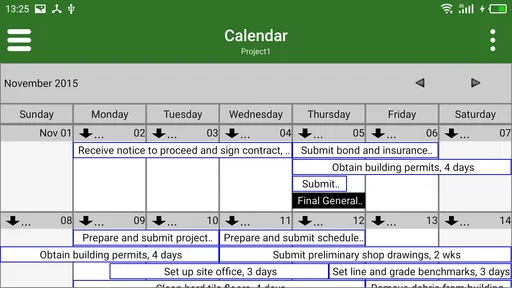
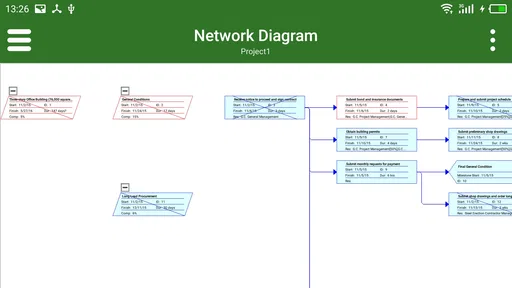
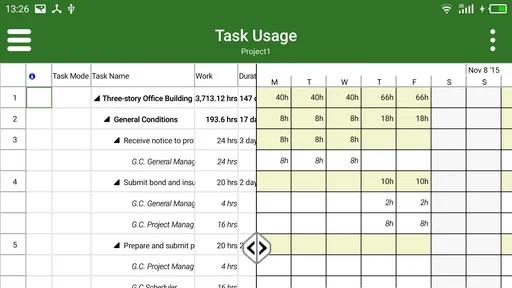
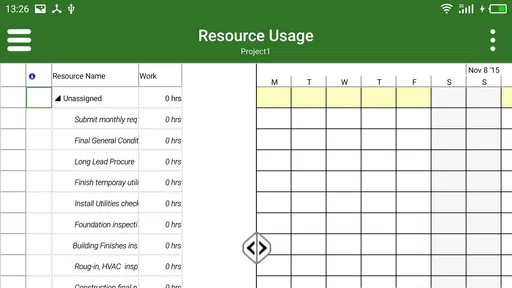
 Analysis by AppCompare
When someone sends me a Microsoft Project file and I only need to inspect it on a phone, I do not necessarily want a full project-management suite. That is the space where gProjectViewer makes sense. Developed by Housatonic Software, this free Business app is designed to open and view MPP files, giving me a way to check project information without sitting at a desktop.
My view is fairly simple: this is a specialist viewer, not a replacement for Microsoft Project and not a complete planning system. That distinction matters more than the store summary. If your job is to review an existing schedule, check task timing while travelling, or confirm what a colleague sent you, it can be useful. If you need to build a project plan, edit dependencies, assign resources, or collaborate with a team, you should approach it with much lower expectations.
The app is free to install and carries an Everyone age rating. It has attracted over one hundred thousand installs, although its average rating is 2.0 from around four hundred ratings, so I would not recommend downloading it blindly. That feedback suggests a product with a narrow purpose and a user experience that may not work equally well for every file or device.
How I would decide whether gProjectViewer belongs on my phone
I would begin by matching the app to the moments when I actually need a project schedule, rather than treating it as another everyday productivity tool. That means considering how often MPP files arrive, what details I need to check on the move, and whether a phone is a practical place to review them. With that test in mind, I can judge where a specialist viewer earns its space.
Start with the file, not the app
The first question is whether you regularly receive MPP files. If the answer is no, this app will probably feel unnecessary. It is not a general spreadsheet viewer, a calendar, or a task list. Its value begins when a Microsoft Project document is already part of your workflow.
I would also separate viewing from editing before installing it. A viewer is useful when the source document has already been prepared by a project manager and I only need to understand the schedule. It is much less suitable when I am responsible for changing dates, restructuring tasks, or maintaining the plan myself. Choosing it for the second job would create frustration because the central need is not simply opening a file.
That distinction gives the app a clear audience: managers checking progress, contractors reviewing a delivery schedule, consultants inspecting a client plan, or team members who need occasional access away from a computer. It can also help someone who receives an MPP attachment but does not have Microsoft Project installed on their phone.
Worth Reading Before You Choose

EA SPORTS FC Mobile 26 Is a Bigger Football Game, but It Takes Time

Flipboard Shows What News Apps Must Do Beyond the Feed

Switching to Android Auto Means Rethinking Your Driving Routine

Google Calendar Makes a Crowded Week Easier to Manage

Ludo King Makes the Most of the Minutes Between Plans

Baby Panda World Brings Quick Play to Modern Phones, but Its Game Library Feels Busy
What I look for during a first test
I would test the exact kind of MPP file I expect to receive rather than relying on a small sample. A simple schedule may open comfortably, while a large plan with many task levels, resource details, or unusual formatting may be harder to interpret on a mobile screen. The practical test is not just “does the file open?” but “can I find the information I need quickly?”
For a useful trial, I would check several everyday actions: opening a file from the location where it normally arrives, moving through the task hierarchy, reading dates without zooming constantly, and returning to the same section later. I would also try a plan with summary tasks and milestones, because those are often the parts I need when reviewing progress at short notice.
The most important decision criterion is readability under pressure. If I am standing in a meeting or answering a client message, a viewer that technically opens the file but makes the schedule difficult to scan is not doing enough. A desktop application remains easier for deep analysis, while a phone viewer earns its place through convenience.
Compatibility is part of the review
gProjectViewer supports Android devices running version 5.0 or later, which covers a broad range of phones and tablets. The current version is 23.3.1204. Those details make it accessible to people using older hardware, but they do not guarantee that every MPP document will appear exactly as its author intended.
Project files can contain more than a simple list of tasks. They may include calendars, outline levels, links between activities, resource assignments, notes, and formatting choices. A mobile viewer may present the useful structure while still requiring patience when a plan is dense. I would therefore treat compatibility as something to verify with a real work file, especially if the document is central to a contractual deadline.
Where the viewer earns its place
The clearest case for keeping a viewer handy is when it helps me answer a specific schedule question without turning a quick check into a laptop session. I would pay particular attention to whether I can move from a project’s broad phases to the relevant activity and retain enough surrounding context to interpret it. That practical value is more important than simply confirming that a document opens.
A practical second screen for project schedules
The strongest use case is quick inspection. Imagine a site supervisor receives an updated MPP file before a morning visit. They do not need to redesign the schedule; they need to check which activities are planned next, understand the sequence, and discuss whether the current timing matches the work on site. A dedicated viewer can be more convenient than waiting to reach a computer.
Another realistic example is a consultant travelling between meetings. The consultant may receive a project plan as an attachment and need to confirm a milestone or explain the order of work during a conversation. In that situation, a lightweight viewer is valuable because it keeps the original schedule available without forcing the person to carry a laptop for a single reference task.
I also see a role for occasional reviewers inside a business. Not everyone who touches a project needs authoring software. A finance colleague may want to understand when major phases are expected to finish. A client representative may need to inspect the plan during a review. For these people, paying for or learning a full planning application may be excessive.
It preserves the context of a project plan
A plain task list can hide the relationship between activities. An MPP document normally represents a structured schedule, so viewing the source file can be more informative than copying a few dates into notes. When I inspect a plan in its original project format, I can reason about the order and grouping of work instead of seeing isolated reminders.
This is one of the less obvious benefits: a viewer can reduce the risk of discussing a task without its surrounding context. If a date looks late, the surrounding activities may explain why. If a milestone appears close, the preceding task chain may show what still has to happen. I would use the app for that kind of situational awareness, not as the final authority for detailed schedule analysis.
Free access lowers the barrier for occasional users
There is no purchase price to install the app, which makes it easy to test with a genuine project file before committing to a workflow. That matters for small teams and independent professionals who only open MPP documents from time to time. The app also includes in-app purchases ranging from $0.99 to $39.99 per item, so I would review any optional purchase carefully rather than assuming every capability is included at no cost.
For me, the free entry point is most useful when the requirement is occasional viewing. I would not choose a tool solely because it is free if it creates repeated work or fails to show an important part of the schedule. Still, the ability to try it without an upfront payment makes the decision less risky for someone with a narrow need.
Three habits that make testing more meaningful
First, I would keep a small test folder containing the types of MPP files I actually encounter: a short plan, a multi-phase plan, and a plan with enough detail to challenge mobile reading. This is more revealing than opening one uncomplicated file and assuming the experience will remain the same.
Second, I would use the app before an important meeting rather than discovering its limitations during one. Open the file, locate the current phase, and confirm that the dates and hierarchy are understandable. If the schedule is shared through a workplace storage service, I would also test the complete path from receiving the file to opening it, because a viewer is only useful when the handoff is smooth.
Third, I would keep the desktop copy available for decisions that affect commitments. A phone screen is excellent for checking a milestone or answering a quick question, but it is not where I would make a complicated baseline comparison or rebuild a dependency chain. Using the app as a reference tool rather than overloading it with authoring expectations is the key trade-off.
Where a different category may fit better
I would compare the app with alternatives by asking what the work itself demands: reading an existing project plan, actively changing a schedule, or tracking a small set of commitments. Those are different jobs, and choosing the wrong kind of tool can add friction even when it appears familiar. The following comparison helps clarify when a viewer is the sensible choice and when another category better matches the task.
Choose a full project-management application for active planning
If I need to create and maintain schedules, I would look beyond a viewer. A full project-management application is the better category for editing tasks, changing relationships, managing resources, and keeping a plan current. The advantage is not simply having more buttons; it is having a workflow built around changing the project rather than observing it.
This matters when several people update the same plan. A viewer can help me understand the latest document, but it does not replace a controlled authoring process. If the team needs comments, approvals, version history, or shared ownership, I would investigate a collaborative service instead. Those needs are fundamentally different from opening an MPP file on a handset.
Use a spreadsheet for lightweight, custom tracking
Some projects do not need Microsoft Project at all. If the work consists of a few owners, dates, and status notes, a spreadsheet may be easier to adapt. It can be more approachable for a small group that already works in rows and columns, especially when the schedule is informal and changes frequently.
The trade-off is that a spreadsheet can lose the structured relationships found in a project schedule. I would not move a complex dependency-driven plan into a spreadsheet simply because it looks familiar. Conversely, I would not introduce an MPP viewer to a team whose real need is a shared checklist. The right choice depends on the structure of the work, not on which app has the more professional appearance.
Use a calendar or task app for personal commitments
For my own appointments and reminders, a calendar or task manager is more natural. Those tools are designed for quick entry, notifications, recurring items, and daily execution. gProjectViewer becomes relevant when the source is a project schedule that someone else has created, not when I want to remember to call a supplier or finish a personal errand.
This comparison also explains why some users may rate a specialist viewer poorly: they may expect a complete productivity tool after seeing a project-related name. I would install it only when MPP viewing is the actual requirement. That narrow focus is a strength for the right person and a limitation for everyone else.
Know the cost of switching before relying on it
The financial cost of trying the app is low because the download is free, but the workflow cost can be higher. If my team currently uses a desktop project application, adding a phone viewer means I must decide which device remains authoritative. I would avoid editing a schedule in one place and discussing an outdated copy in another.
There is also a learning cost. Even a simple viewer requires me to understand the way the project file organizes summary tasks, milestones, and detailed activities. I would spend a few minutes learning how to move from the broad project view to the specific task I need. That is worthwhile for repeated use, but not necessarily for a single file that I will never open again.
Before making it part of a business process, I would agree on a basic rule: the mobile app is for reference, while the designated desktop or team system remains the source for changes. That small decision prevents a common problem in project work—people acting on different versions of the same schedule.
My recommendation after weighing the trade-offs
My recommendation comes down to keeping the tool’s role narrow and testing it against the files I expect to use. I would treat it as a reference point for project information, not as the place where a team’s schedule is authored or controlled. Weighing that boundary against the convenience of mobile access leads to a practical verdict about who is likely to benefit.
Who should install it
I would recommend gProjectViewer to someone who regularly receives Microsoft Project files and mainly needs to inspect them on an Android phone or tablet. It is especially sensible for occasional reviewers, travelling managers, consultants, and clients who need access to the plan without becoming schedule authors.
I would also suggest testing it before a trip or meeting, using a real file and not just an empty example. Confirm that the document opens, that the task structure is legible, and that the information you normally need can be found without excessive effort. Because the app is free to install, this practical test is the fairest way to judge whether it fits your particular documents.
Who should skip it
I would skip it if I need a complete mobile project-management workspace. People who expect to build schedules, edit complex plans, coordinate a team, or replace desktop project software are likely to be disappointed by a viewer-first approach. I would also look elsewhere if my work is mostly personal reminders, simple checklists, or shared spreadsheet tracking.
The average rating of 2.0 from roughly four hundred ratings is a reason to be cautious, not an automatic verdict. Specialist apps can receive poor feedback when they are used for the wrong job, but the rating still tells me to test carefully and keep an alternative workflow available. I would not make it the only way to access a deadline-sensitive project until it had handled my files reliably.
The bottom line for everyday use
gProjectViewer is best understood as a bridge between a desktop-created MPP schedule and a person who needs to read that schedule away from the desk. Its appeal is convenience, not breadth. I appreciate that it targets a specific problem and can be tried without an upfront price, but I would keep my expectations firmly focused on viewing.
My final recommendation is conditional but positive: install it if MPP files are already part of your work and your main question is “what does this project plan say?” Choose a full project-management tool when the question is “how do I change, share, and control this plan?” That distinction will save more time than any feature checklist. For quick reference, the app may be a useful companion; for serious schedule ownership, I would keep a more capable alternative in charge.
Pros
- Clear project timelines make schedules easy to understand.
- Supports multiple project views for different planning needs.
- Useful for reviewing project progress away from a desktop.
- Compact interface keeps essential project details accessible.
- Helpful for teams working with standard project files.
Cons
- Mobile editing options may feel limited for complex schedules.
- Large project files can take longer to load on some devices.
- The interface may require time to learn for first-time users.
- Advanced collaboration features are not a major focus.
- Some features may depend on the file format being imported.
FAQs for gProjectViewer
What is gProjectViewer used for?
gProjectViewer is designed for opening and reviewing project files, making it useful for users who need to inspect schedules, tasks, resources, milestones, and related project information without relying on the full desktop project-management software. It is primarily a viewing tool, so users should not expect the same editing, collaboration, or planning capabilities found in a complete project-management suite.
Which project file formats does gProjectViewer support?
Before downloading gProjectViewer, check whether it supports the file format used by your organization or project team. Compatibility can depend on the specific version of the file and the features included in it. Basic schedules may display correctly, while advanced formatting, custom fields, filters, linked resources, or specialized planning data may not appear exactly as they do in the original application.
Can I edit project schedules with gProjectViewer?
gProjectViewer is mainly intended for viewing and inspecting project information rather than creating or fully editing schedules. You may be able to navigate tasks, review dates, examine dependencies, and study project details, but it should not automatically be considered a replacement for professional planning software. If you need to modify assignments, update progress, or restructure a project, verify the app’s current editing capabilities first.
Is gProjectViewer suitable for sharing project information with clients or coworkers?
The app can be convenient when someone needs to review a project without installing the original desktop software, especially for meetings, quick checks, or status discussions. However, users should confirm how files are transferred and whether sensitive project data remains stored locally or is uploaded elsewhere. For confidential schedules, review the privacy policy and avoid sharing files through unsecured channels.
What should I check before installing gProjectViewer on Android or iOS?
Before installation, verify that your device meets the app’s operating-system requirements and has enough storage for the application and imported project files. It is also worth checking the latest store listing for supported formats, permissions, update history, pricing, and user feedback. If your work depends on complex project data, test a copy of an important file first to confirm that it opens and displays correctly.


